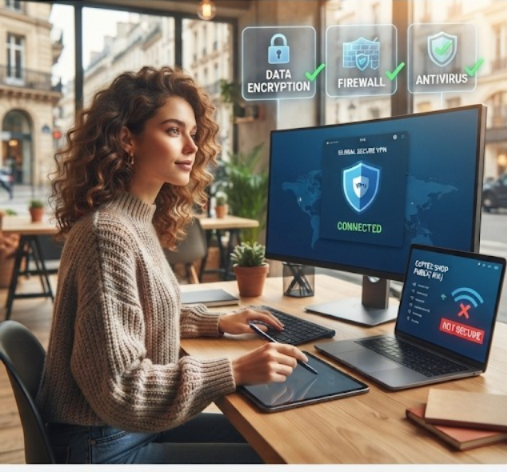
The increase in remote work opportunities has simplified the process of transitioning into a digital nomad lifestyle. Whether you’re working from a beachside café, a co-working space, or a hotel room, you can stay connected and productive from almost anywhere in the world. However, this freedom also comes with increased cybersecurity risks. Public Wi-Fi, unsecured devices, and phishing scams can expose your sensitive information if you’re not careful.
In this guide, you’ll learn the essential cybersecurity basics for remote digital nomads and discover practical ways to protect your personal and professional data while working remotely.
Why Cybersecurity Matters for Digital Nomads
Unlike traditional office environments, remote workers often rely on public internet connections and personal devices. Cybercriminals target these situations because they are generally less secure. A single security breach can result in stolen passwords, financial loss, identity theft, or leaked client information.
By following basic cybersecurity practices, digital nomads can reduce risks and work confidently from anywhere in the world.
Use Secure Internet Connections
One of the biggest cybersecurity threats for remote workers is using unsecured public Wi-Fi networks.
To stay safe:
- Avoid accessing banking or sensitive work accounts on public Wi-Fi.
- Use a trusted Virtual Private Network (VPN) to encrypt your internet traffic.
- Turn off automatic Wi-Fi connections on your devices.
- Verify the correct network name before connecting.
Using secure internet connections helps prevent hackers from intercepting your online activities.
Create Strong and Unique Passwords
Weak passwords are among the leading causes of compromised accounts.
Follow these password best practices:
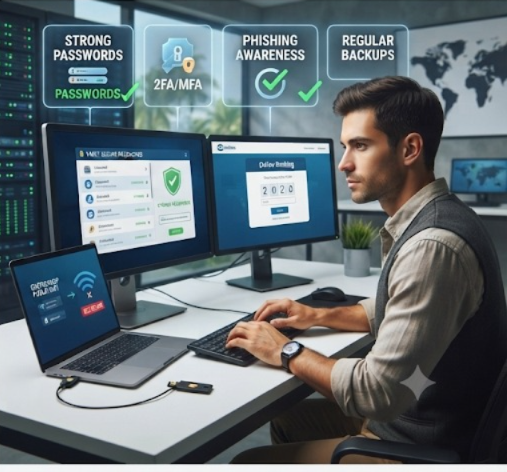
- Create passwords with at least 12–16 characters.
- Incorporate capital letters, small letters, digits, and special characters.
- Never reuse passwords across multiple websites.
- Store passwords using a trusted password manager.
Strong passwords significantly improve your online security.
Enable Multi-Factor Authentication (MFA)
Multi-Factor Authentication adds an extra layer of protection to your accounts. Even if someone steals your password, they still need a second verification method to gain access.
Enable MFA for:
- Email accounts
- Cloud storage
- Banking applications
- Work platforms
- Social media accounts
Authenticator applications are typically more secure compared to SMS verification.
Keep Devices and Software Updated
Software updates often include important security patches that protect against newly discovered vulnerabilities.
Always update:
- Operating systems
- Web browsers
- Antivirus software
- Productivity applications
- Mobile apps
Enabling automatic updates ensures your devices remain protected.
Protect Your Devices While Traveling
Remote workers frequently travel with laptops, smartphones, and tablets, making physical security just as important as digital security.
Consider these precautions:
- Lock your devices with strong PINs or biometric authentication.
- Never leave devices unattended in public places.
- Use encrypted storage whenever possible.
- Keep regular backups of important files.
Physical protection reduces the risk of theft and unauthorized access.
Recognize Phishing Scams
Phishing attacks remain one of the most common cybersecurity threats. Criminals often send fake emails or messages pretending to be legitimate companies.
Warning signs include:
- Unexpected requests for passwords
- Urgent messages demanding immediate action
- Suspicious attachments
- Misspelled website addresses
- Unknown email senders
Always verify requests before clicking links or downloading files.
Secure Cloud Storage and File Sharing
Cloud services make collaboration easier, but they should be configured securely.
Best practices include:
- Enable file encryption.
- Share files only with trusted individuals.
- Review access permissions regularly.
- Remove unused shared links.
- Back up important documents.
Proper cloud security protects both personal and client information.
Backup Your Data Regularly
Unexpected events such as ransomware attacks, hardware failures, or accidental deletion can result in data loss.
Use the 3-2-1 backup strategy:
- Keep three copies of your data.
- Store backups on two different storage types.
- Keep one backup in an off-site or cloud location.
Regular backups ensure you can quickly recover important information.
Best Cybersecurity Habits for Remote Digital Nomads
Developing good digital habits is essential for long-term security.
Daily habits include:
- Lock your screen whenever you step away.
- Log out of unused accounts.
- Monitor account activity regularly.
- Avoid downloading files from unknown sources.
- Use trusted antivirus software.
- Stay informed about emerging cyber threats.
Consistent security practices greatly reduce your exposure to cyberattacks.
Cybersecurity should be a top priority for every remote digital nomad. While working from different locations offers flexibility and freedom, it also introduces unique security challenges. By using secure internet connections, creating strong passwords, enabling multi-factor authentication, keeping devices updated, recognizing phishing scams, and backing up important data, you can protect your digital life wherever your work takes you.
Building strong cybersecurity habits today will help safeguard your personal information, professional reputation, and financial security in the future.
Effects of AI in Upcoming Technology
Manhole – Essential Access Points in Urban Infrastructure
RCPC Manhole Covers and Frames
Read Also : Social Network Website Design